
Recipe: follow up on a Quick Add procedure
Sometimes a procedure gets added to a patient’s chart without an appointment — through Open Dental’s Account → Procedures → Quick Add. Those are easy to lose because nothing’s on the schedule to remind you. This recipe catches them.
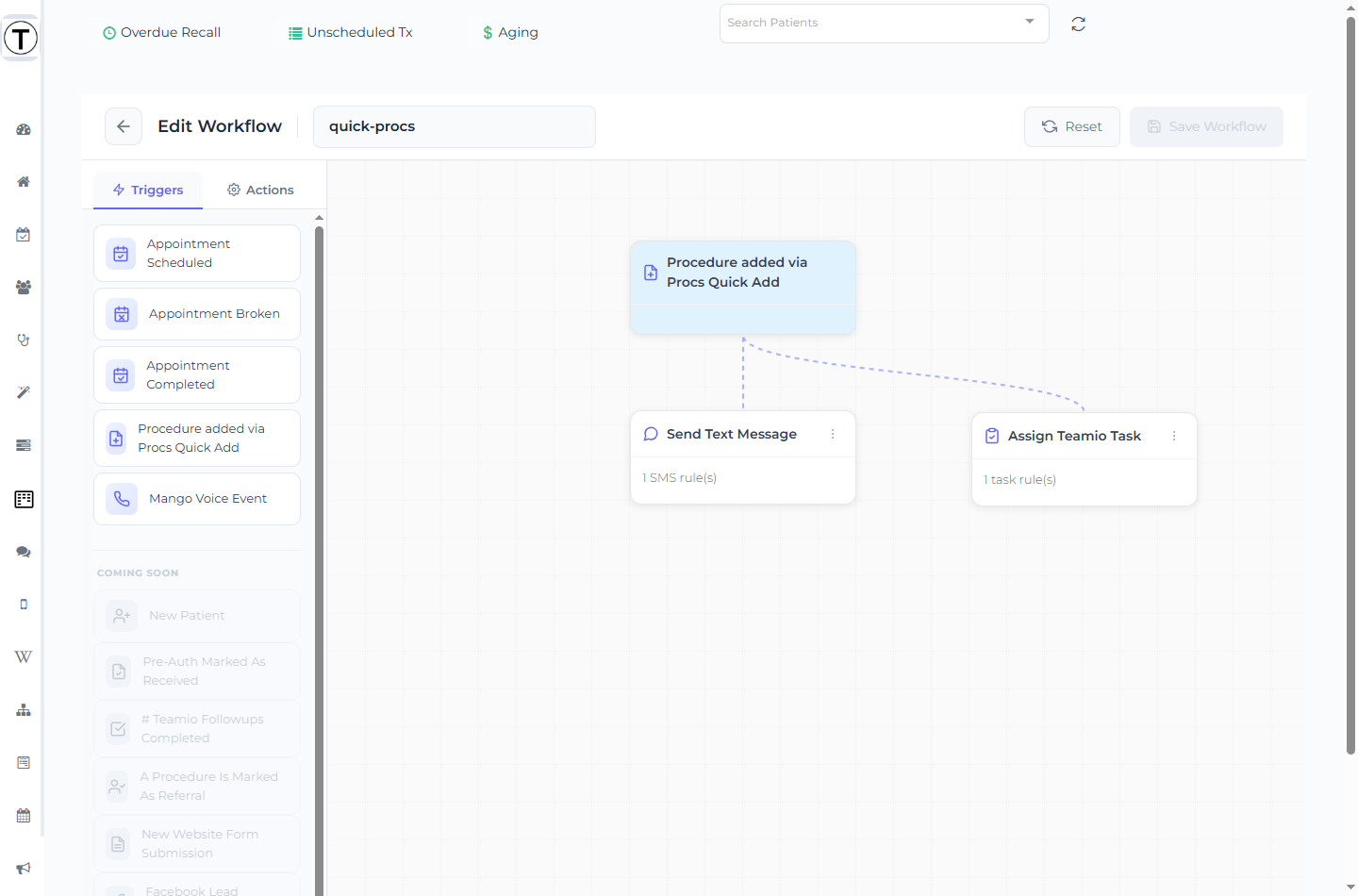
The workflow
Section titled “The workflow”- Trigger: Procedure added via Procs Quick Add — fires when a procedure is added through Quick Add, no appointment needed
- Action: Send Text Message / Send Email, and/or Assign Teamio Task
- Proc Code: the procedures this should apply to
- Send When / Due Date: Immediately, 1 Day After, 2 Days After, or 1 Week After Procedure is Added (this trigger only offers after-style timing)
Examples
Section titled “Examples”- A doctor Quick-Adds a diagnosed filling during a hygiene visit → text the patient a note that treatment was recommended, with a link to book.
- A whitening procedure is Quick-Added → task the front desk to present financing options.
Why it matters
Section titled “Why it matters”Quick Add is where unscheduled treatment quietly piles up. Wiring a follow-up to the trigger means the patient hears from you the same day — long before the item would surface on the Unscheduled Treatment list.