
Online booking alerts
When a patient books through your online scheduling page, a New online booking card appears in the Action Center right away. There’s no wait for the appointment to reach Open Dental first.
What the card shows
Section titled “What the card shows”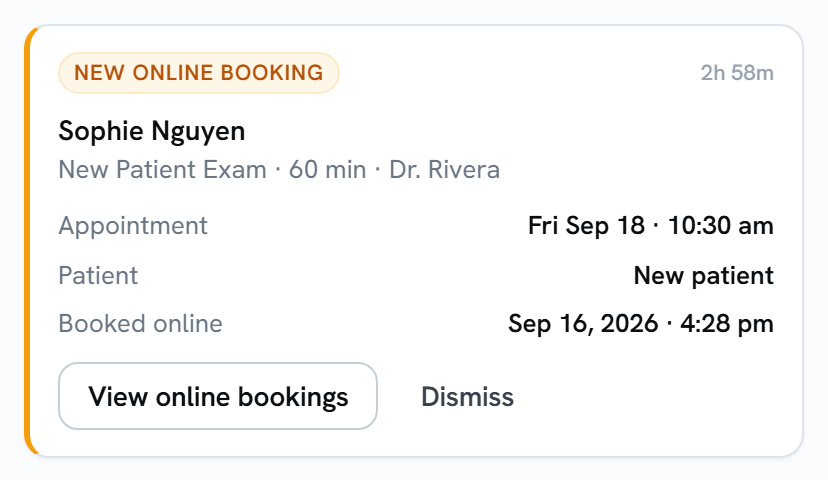
- The patient’s name.
- The appointment type, how long it is, and the provider.
- Appointment: the day and time they booked, like Fri Sep 18 · 10:30 am. The year is added when it isn’t this year.
- Patient: New patient or Returning patient, as the patient chose when booking.
- Booked online: when they booked.
Finding upcoming bookings
Section titled “Finding upcoming bookings”On the Appts chip, turn on Next 7 days to see only bookings for today through the next week. That’s handy for spotting a same-week new patient who needs forms sent.
Acting on the card
Section titled “Acting on the card”- View online bookings opens the Online Appointments dashboard, which lists every online booking.
- Dismiss clears the card once you’ve seen it. See Clearing alerts for whether that clears it for everyone or just for you.
A booking doesn’t need a reply, so the card stays until someone dismisses it. Otherwise it’s removed after 30 days.