
Photos and attachments
Patients text in photos constantly — insurance cards, IDs, “does this look infected?” pictures. Teamio shows them inline and can file the still images straight onto the patient’s Open Dental chart.
Viewing photos and files
Section titled “Viewing photos and files”A patient-sent photo renders inline in the thread with an expand icon overlay in its corner. Select the photo (or the expand icon) to open it full-size in a lightbox; close the lightbox with its X button or by pressing Esc.
Non-image attachments (PDFs and the like) appear as a paperclip row in the thread and download when you select them rather than opening in the lightbox.
File photos to Open Dental automatically
Section titled “File photos to Open Dental automatically”The genuinely time-saving part: patient-sent images can be saved into Open Dental imaging on the patient’s chart, automatically.
- Select the gear icon at the top right of the Patient Conversations page (tooltip SMS Conversation Settings). A panel slides out from the right.
- The top of this panel is the notification settings — sound and desktop alerts for new patient texts, plus a built-in troubleshooting helper. Those are covered in Message notifications. Scroll past them to the bottom of the panel to reach the photo-filing setting.
- In the Save patient-sent images to Open Dental section, open the dropdown — its default is —Disabled (don’t save patient SMS photos to OD)—.
- Choose the imaging category the photos should file under. Choosing a category is turning the feature on — there’s no separate on/off toggle, and leaving it empty keeps photos in the chat only.
- Select the green Save button at the top of the panel.

This section lives at the very bottom of the panel, below the notification settings — so you’ll need to scroll down to find it:
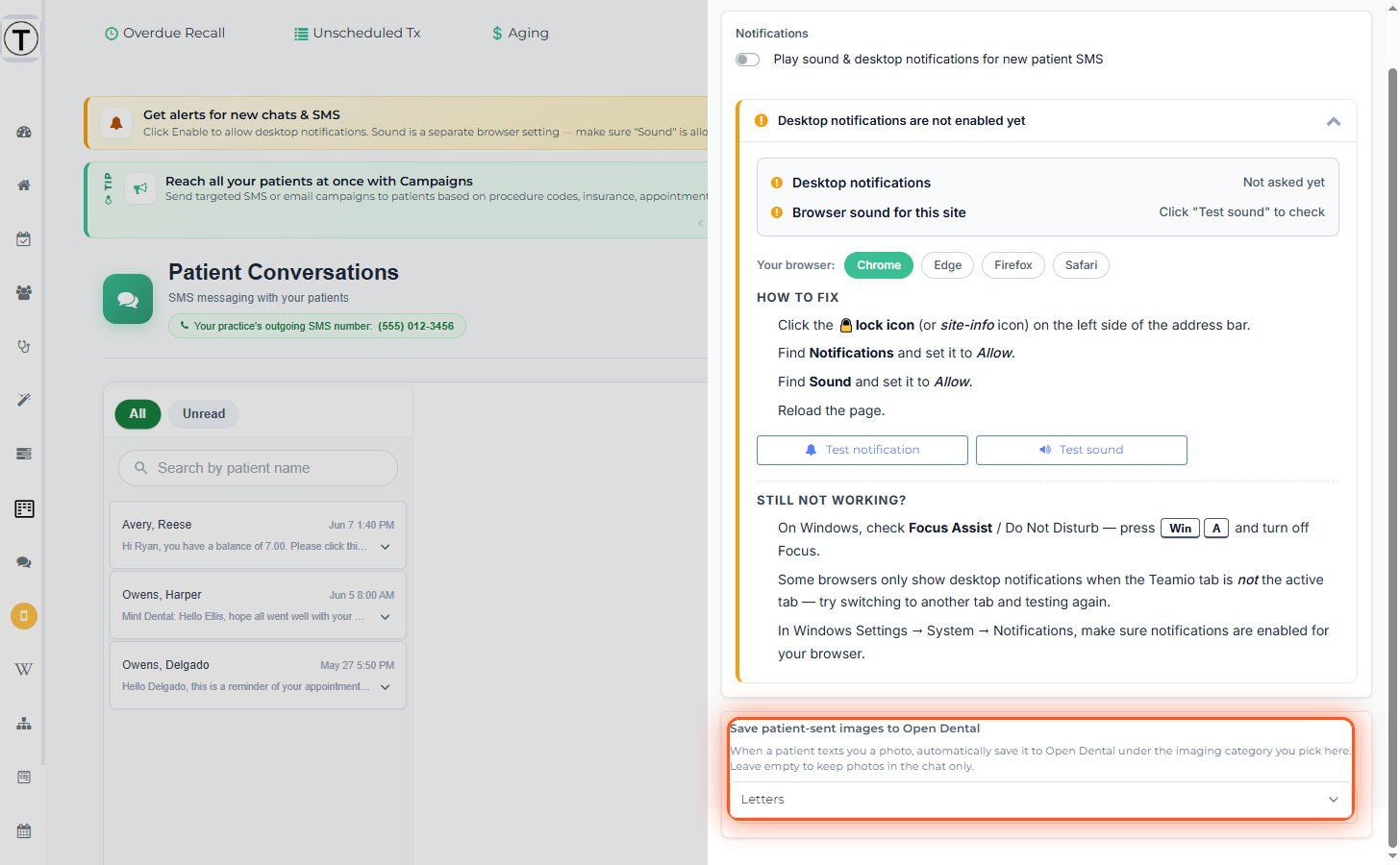
From then on, the insurance card a patient texts ends up where billing needs it, with no download-and-reupload shuffle. (Filing runs through the connector on your Open Dental server — same rules as forms filing.)
What gets filed — and what doesn’t
Section titled “What gets filed — and what doesn’t”- Only still images (JPG/PNG) are filed to Open Dental. Video, audio, and PDF attachments are skipped by design — they stay in the chat only.
- Filing requires the texter to be a resolved patient (matched to a PatNum in Open Dental). Photos from an unmatched number stay in the conversation but aren’t filed.
- If your Open Dental server is offline, photos queue and file when it’s back. Staged photos are held for up to 30 days while waiting; after that they expire and won’t file (they remain visible in the chat).
Sending attachments out
Section titled “Sending attachments out”Use the paperclip in the composer to send an image or file to the patient. Outbound SMS/MMS delivery supports JPG, PNG, MP3, AMR, MP4, and PDF only, up to 5 MB. Larger files or other types trigger a warning that SMS recipients won’t receive them.
- Clinical photos in the chart still deserve a task for the doctor to review — create one from the conversation.
- A patient texting from a number that isn’t on file won’t auto-file; resolve the patient in Open Dental first if the photo should land on a chart.
Related
Section titled “Related”- Sending a photo to Open Dental — when your team takes the photo instead, from the patient’s profile
- Texting with patients
- How Teamio syncs with Open Dental