
Recording results in Open Dental
Your team works in Open Dental. A verification that only lives in Teamio is half-delivered — so Teamio can write the result back into the patient’s record. Four independent switches control exactly what gets written.
Where: Precheck settings → Automation → the Record in Open Dental section.
The four switches
Section titled “The four switches”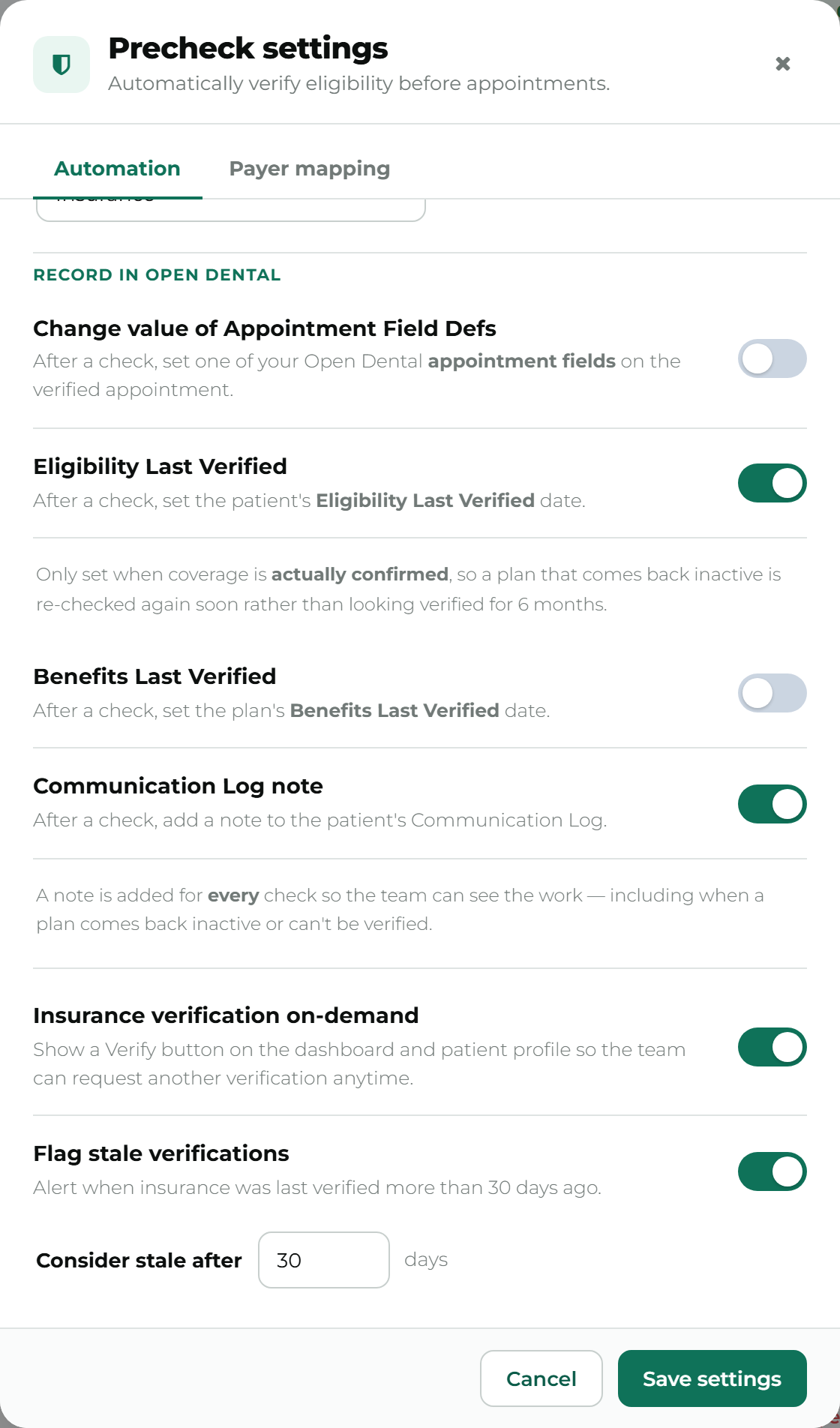
| Setting | Default | What it writes | Where it lands |
|---|---|---|---|
| Change value of Appointment Field Defs | Off | Your chosen text (e.g. VERIFIED) | One of your practice’s own Open Dental Appointment Field Defs, on the appointment |
| Eligibility Last Verified | On | The patient’s eligibility date | Family module, on the patient’s plan |
| Benefits Last Verified | Off | The plan’s benefits date | Family module, on the plan |
| Communication Log note | On | A short note | The patient’s Communication Log |
Change value of Appointment Field Defs
Section titled “Change value of Appointment Field Defs”After a check, set one of your Open Dental appointment fields on the verified appointment.
Off by default. Unlike the two dates below, this doesn’t stamp a date — it writes whatever text your practice chooses (for example, setting an Insurance Verification field to VERIFIED) into one of your own Open Dental Appointment Field Defs. Like the eligibility and benefits dates, it’s only written when coverage is actually confirmed, and it needs both an appointment field and a value chosen before it can be turned on.
Full details — including which appointment gets the write when a check runs from the patient’s profile instead of an appointment, and how to create the field in Open Dental if you don’t have one — are in Precheck settings → Change value of Appointment Field Defs.
Eligibility Last Verified
Section titled “Eligibility Last Verified”After a check, set the patient’s Eligibility Last Verified date.
This is the one most practices want, and it’s on by default. It updates the date your team already reads when they open a patient’s family record.
Only set when coverage is actually confirmed, so a plan that comes back inactive is re-checked again soon rather than looking verified for {your window}.
That’s the important nuance: the date is stamped on verified results only. A plan that came back inactive or couldn’t be reached leaves the date alone, so it doesn’t look freshly confirmed when it isn’t.
This date also feeds back into automation — see Automatic verification. Teamio reads it before every run, which is how manual verifications your team does in Open Dental stop Teamio from paying to repeat them.
Benefits Last Verified
Section titled “Benefits Last Verified”After a check, set the plan’s Benefits Last Verified date.
Off by default, deliberately, because of how Open Dental stores it:
Benefits are stored per plan in Open Dental, so this date applies to every patient on the same plan — not only the one you verified.
Verify one employee of a large employer group and every patient on that plan shows a fresh benefits date. That’s correct per Open Dental’s own model, but it’s a decision your practice should make knowingly rather than inherit. Turn it on if your workflow treats that date as plan-level. Leave it off if your team reads it as “we checked this patient”.
Like the eligibility date, it’s only set when coverage is actually confirmed.
Communication Log note
Section titled “Communication Log note”After a check, add a note to the patient’s Communication Log.
On by default, and it behaves differently from the two dates:
A note is added for every check so the team can see the work — including when a plan comes back inactive or can’t be verified.
So the pattern is: dates on success only, notes on everything. That asymmetry is the design. Your team can see that the work happened even when the answer wasn’t a clean yes, and the note says why — for example that the carrier’s system was temporarily unavailable, versus something on the record needing a fix.
A note looks like:
[Teamio]: Patient primary insurance verified on 2026-08-14 09:54:41
Repeat notes for the same unchanged outcome are suppressed for a couple of weeks, so a patient whose carrier is having a bad run doesn’t collect a near-identical note every night. Verified and inactive results are never suppressed — those are news, and always file.
Turning write-back off
Section titled “Turning write-back off”Any of the four can be switched off independently. Turning all four off leaves Teamio a read-only tool: results live on the dashboard, in the drawer and in the handout, and nothing is written into Open Dental.
Troubleshooting
Section titled “Troubleshooting”The date didn’t change after a check
Section titled “The date didn’t change after a check”Most likely the check wasn’t Verified. Dates are only written on confirmed coverage. Check the status badge on the dashboard.
The date changed for patients I didn’t verify
Section titled “The date changed for patients I didn’t verify”That’s Benefits Last Verified doing what Open Dental’s model says it does — it’s a plan-level date. Turn it off if that isn’t what your team expects.
Notes are appearing but dates aren’t
Section titled “Notes are appearing but dates aren’t”The four switches are independent. Confirm Eligibility Last Verified is on, and remember it only fires on verified results while notes fire on every check.
The appointment field didn’t change after a check
Section titled “The appointment field didn’t change after a check”Same rule as the dates: only a Verified result writes it. Also check that the appointment field dropdown still resolves — if the field was deleted in Open Dental, Precheck settings shows it as (not found).
Nothing is reaching Open Dental at all
Section titled “Nothing is reaching Open Dental at all”Write-backs travel through the Teamio sync running at your practice. If that’s offline — a server reboot, a power cut — writes queue rather than failing, and land when it reconnects. If nothing arrives after the connection is back, contact Teamio.