
Setting up financing options
Treatment Presenter can present a financing offer as a menu of terms — short 0%-if-paid-in-time options and longer reduced-rate options — each showing the patient an estimated monthly payment worked out from their own portion. It mirrors the layout offices get from financing-consultant spreadsheets, and it looks the same chairside, on the patient’s link, and on the signed PDF.
Where: Tx Presenter → Settings → Payment Options → add or edit an option and set its type to Financing.
Build the tiers
Section titled “Build the tiers”- Give the option a title (e.g. “No Down Payment”) and a short patient-facing description.
- Under Deferred Interest, click Add and enter each duration you offer (6, 12, …). These show as “X Months Deferred Interest,” estimated at 0% over the term.
- Under Reduced APR, set the shared APR (e.g. 14.9%), then Add each longer duration (24, 36, 48, 60). These show as “X Months Reduced APR @ 14.9%,” figured at that rate.
- Leave a group empty to omit it (for example, Reduced APR only). Add the legal fine print under Terms / conditions, then Save.
What the patient sees
Section titled “What the patient sees”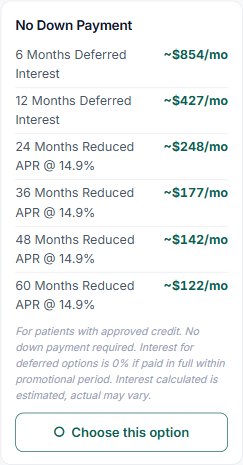
The financing card shows a tier table — each term with its estimated monthly amount — right under the option, identical on the patient’s link, in chairside Present Mode, and on the signed PDF. In Present Mode the tiers stay visible even with prices turned off, so the patient can weigh the terms before choosing. They tap “I’m interested in financing” — the menu is informational; the exact term is finalized with your office or the financing partner (Teamio doesn’t process the financing).
Good to know:
- The dollar amounts are per patient, figured from each patient’s portion — so the Settings screen shows the term structure, not dollars. (Deferred = portion ÷ months; Reduced APR = standard amortization at your APR.)
- Tiers are practice-wide. You set them once; the Builder shows them read-only for each patient. Editing them in Settings updates every patient’s plan.
- Existing single-term financing keeps working — it just shows as one row.
- Your Open Dental payment type for each financing partner still applies when you “mark as financed” chairside.