
Reading a single campaign's results
The campaign detail page is the one place with real, live results for a specific campaign — every metric, who received it, what they were sent, and what they clicked.
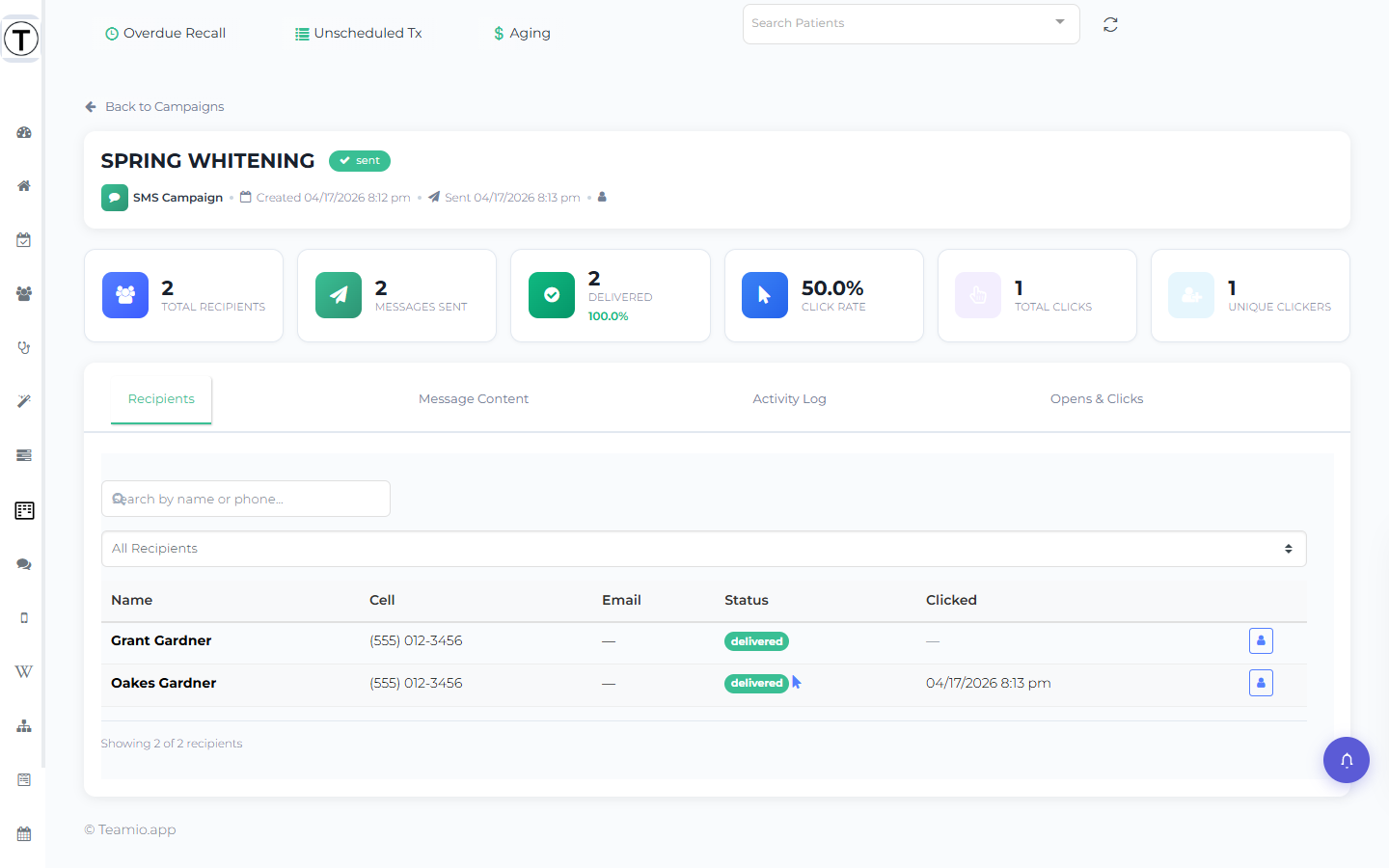
Where: From the Campaigns list, click a sent campaign row — or use its View Details menu item — to open /app/campaigns/<id>. A Back to Campaigns link returns you to the list.
The header
Section titled “The header”The header card shows the campaign name, a status badge, the type, the created and sent timestamps, and who created it. While a campaign is going out, a live Campaign is sending… progress bar tracks it. If any recipients failed, an N recipients failed alert appears with a Retry Failed button.
Metric cards
Section titled “Metric cards”A row of cards summarizes performance:
- Total Recipients / Patients
- Messages Sent
- Delivered (with delivery rate)
- Opened (with open rate — email)
- Click Rate
- Total Clicks
- Unique Clickers
- Failed
For what each metric means and which to act on, see Reading campaign statistics.
Recipients
Section titled “Recipients”Every patient in the send, with a search box (by name or phone) and a status filter — All, Sent, Delivered, Clicked, Not Clicked, Failed, Pending. For SMS + Email campaigns each patient shows a status badge per channel. A per-recipient button opens that patient. This is the first place to check “did this patient get it?” — see Troubleshooting campaign sends.
Message Content
Section titled “Message Content”Exactly what was sent: for SMS, the message in a bubble with its character and segment counts; for email, the subject line and the rendered HTML body.
Activity Log
Section titled “Activity Log”A timeline of campaign events, timestamped in your site’s timezone.
Opens & Clicks
Section titled “Opens & Clicks”The engagement detail:
- Opens Breakdown and Clicks Breakdown (including CTOR, clicks among openers).
- A Link Performance table — per link, the Total Clicks and Unique Clickers, split by SMS vs Email channel.
- A Click Timeline of who clicked what, and when.