
Recipe: broken-appointment rescue
Every broken appointment is revenue walking out the door. This recipe responds within moments — while the patient still has their phone in hand — and adds a human backstop for the ones the text doesn’t catch.
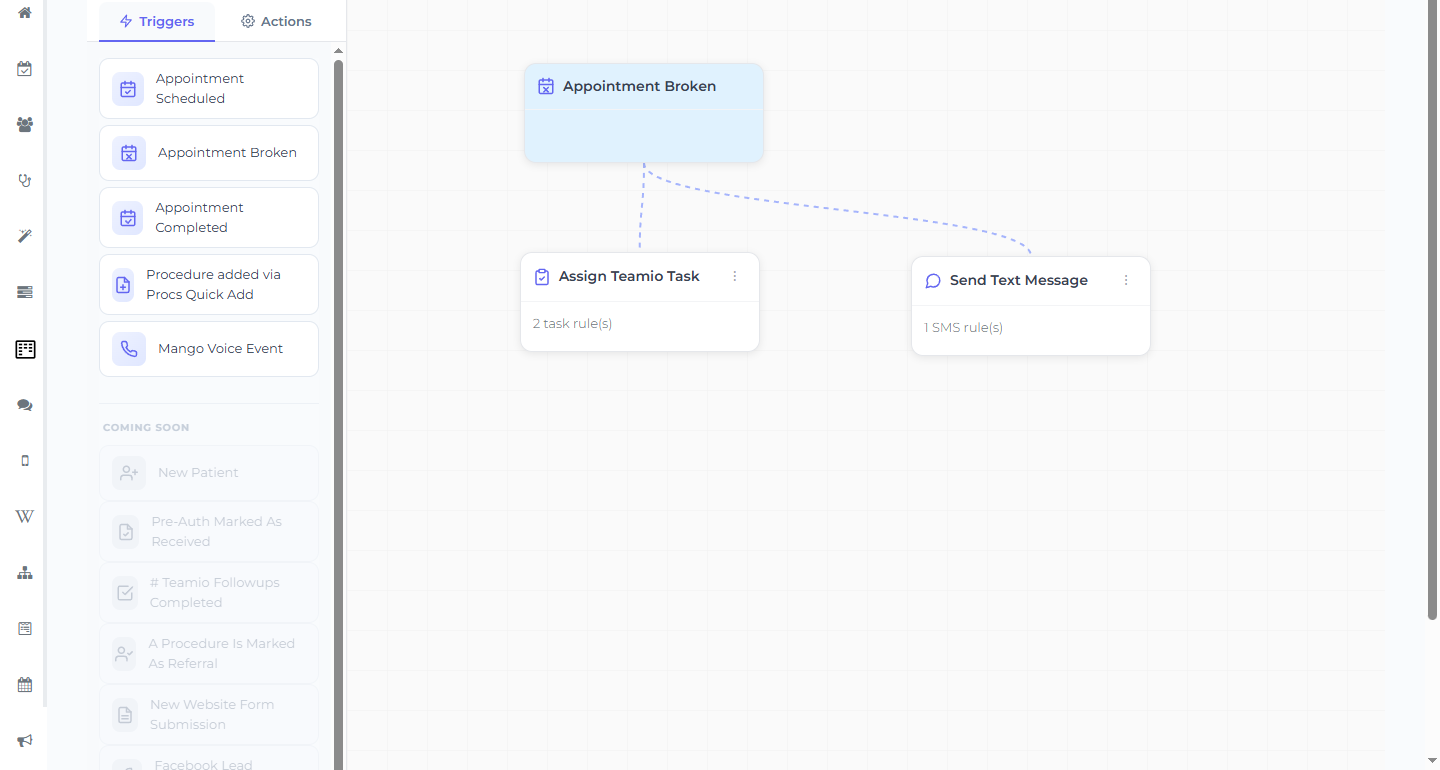
One workflow, two parallel actions
Section titled “One workflow, two parallel actions”Start from the built-in Broken Appointment Alert quick-start template (in New Workflow or Suggested Workflows), or build it yourself:
- Trigger: Appointment Broken
- Action 1 — Send Text Message (connected straight to the trigger)
- Template: a Wiki SMS template with your rescue message (there’s no free-text message box in the action — the wording lives in the template).
- Send When: Immediately (other options are 1 Day, 2 Days, 1 Week After Appointment is Broken).
- Action 2 — Assign Teamio Task (also connected straight to the trigger, as a parallel branch)
- Assign To: the front desk
- Description: “Call patient re: broken appointment — rebook if no reply to the rescue text.”
- Due Date: Immediately
Both actions wire straight to the Appointment Broken trigger so they run at the same time.
The rescue message lives in a Wiki template
Section titled “The rescue message lives in a Wiki template”Put the wording in a Wiki SMS template and select it in the SMS rule’s Template dropdown. A friendly example to adapt:
Hi, it’s [Practice Name]. We’re sorry we missed you today! Reply here or call us and we’ll find a new time that works.
The text catches the easy rebooks automatically; the task makes sure a person follows up on the rest. Patient replies arrive in SMS Conversations.
Measure it
Section titled “Measure it”After a couple of weeks, open the Broken Appointments list (top nav) and compare rebooking speed. Check the workflow’s View Activity for steady Success rows — but remember the activity view only shows the last 7 days, so use the Broken Appointments list (not the activity table alone) for a longer-range comparison.