
When a patient texts STOP (opt-outs)
When a patient replies STOP to your practice’s number, Teamio stops texting that phone number — every reminder, campaign, and manual text — until the patient texts START. Nobody on your team has to remember to do anything.
Who this affects: every practice that texts patients from Teamio. Where you’ll see it: the patient’s profile, Patient Conversations, and anywhere you can send a text.
What counts as opting out
Section titled “What counts as opting out”A patient opts out when their whole reply is one of these words (capital or lowercase letters both work):
STOP · STOPALL · UNSUBSCRIBE · CANCEL · END · QUIT · OPTOUT · REVOKE
The word has to be the entire message. “Stop” on its own opts the patient out; “please stop calling me” or “cancel my appointment” does not — those arrive in Patient Conversations as a normal reply for your team to read.
What happens the moment a patient opts out
Section titled “What happens the moment a patient opts out”- Their phone number stops getting texts from your practice. The block is on the phone number, so if several family members share that number, none of them get texts from you until the patient opts back in. WhatsApp messages to that number stop too.
- Open Dental gets a note. Teamio adds a communication log entry to each patient on that phone number, reading [Teamio] Patient opted out of text messages by replying STOP on 9/14/2026 (with the word they used and the date). The STOP message itself also lands in the log like any incoming text.
- Your team sees why. Anywhere you’d normally text the patient, Teamio shows the reason instead of sending — see What your team sees.
An opt-out only affects your practice’s number. It never blocks texts from another practice that uses Teamio.
Sometimes a patient opts out directly with their mobile carrier instead of by replying to you. When the carrier turns away one of your texts for that reason, Teamio records the opt-out the same way and adds a note to the patient’s Open Dental communication log: Text not sent: this patient has opted out of text messages (reported by the carrier on …).
What gets held back
Section titled “What gets held back”While the phone number is opted out, Teamio does not send any of these texts to it:
- Texts your team types in Patient Conversations or from the patient’s profile
- Appointment reminders and recall reminders
- Campaign texts
- Workflow text messages
- Form and wiki links, follow-up texts, and payment links sent by text
- Treatment plan links and treatment plan message notifications sent by text
- Review requests sent by text
- Online booking confirmation texts and booking verification codes
Email is not affected. Replying STOP only turns off texts. Where a feature can also email the patient — such as a payment link, a treatment plan, or a review request — the email still goes out.
A text Teamio holds back is never sent, so it uses no message credits. See Costs and delivery.
What your team sees
Section titled “What your team sees”On the patient’s profile, the Text button is grayed out. Hover over it to see why:
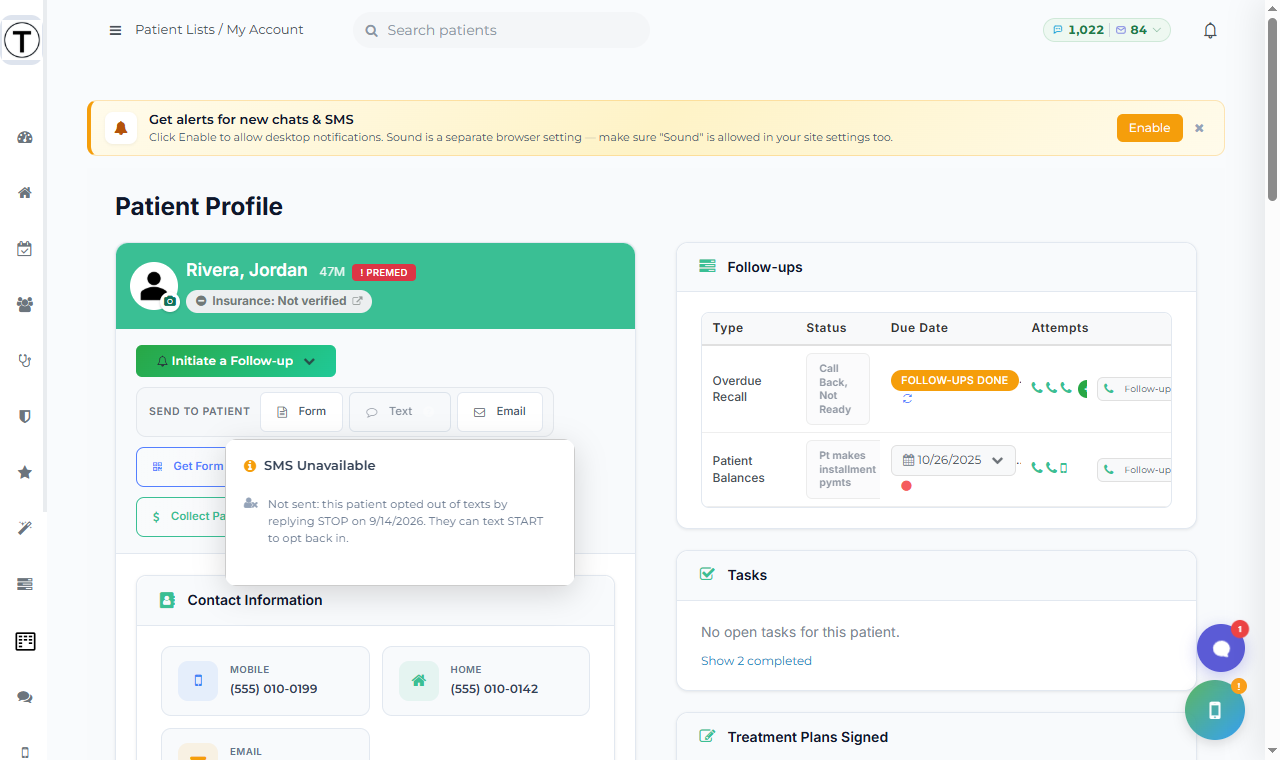
The message reads Not sent: this patient opted out of texts by replying STOP on [date]. They can text START to opt back in.
When you try to send a text — in Patient Conversations, when starting a new conversation, or from a follow-up, payment, or treatment plan window — Teamio shows the same reason in a warning and doesn’t send.
In campaign results, a patient who opted out shows as Skipped (not Failed), with the reason underneath.
How a patient opts back in
Section titled “How a patient opts back in”Only the patient can undo a texted opt-out. They reply START to your practice’s number (UNSTOP and YES also work, as the whole message). Teamio then:
- Lets texts go to that phone number again, right away
- Adds a note to each patient on that number in Open Dental: [Teamio] Patient opted back in to text messages by replying START on [date]
A START from a number that never opted out doesn’t change anything.
If a patient tries to book online from a number that has opted out, the booking page tells them: This number has opted out of texts from this office. Text START to [your practice’s number] to receive a code.
What your team can and can’t do
Section titled “What your team can and can’t do”- You can’t turn texts back on for a patient who replied STOP. There’s no override button — by carrier rules, the patient has to text START themselves. If they tell you over the phone that they want texts again, ask them to text START to your number.
- You can still call and email them. An opt-out only stops texts.
- Never add them back to texting another way — for example, by moving their number to a different family member’s chart. The block follows the phone number anyway.
Blocked by an Open Dental setting instead
Section titled “Blocked by an Open Dental setting instead”Texts can also be turned off for a patient in Open Dental. When that’s the reason, the hover message reads Not sent: this patient’s Open Dental record says no text messages, with a tip to change the patient’s text setting in Open Dental:
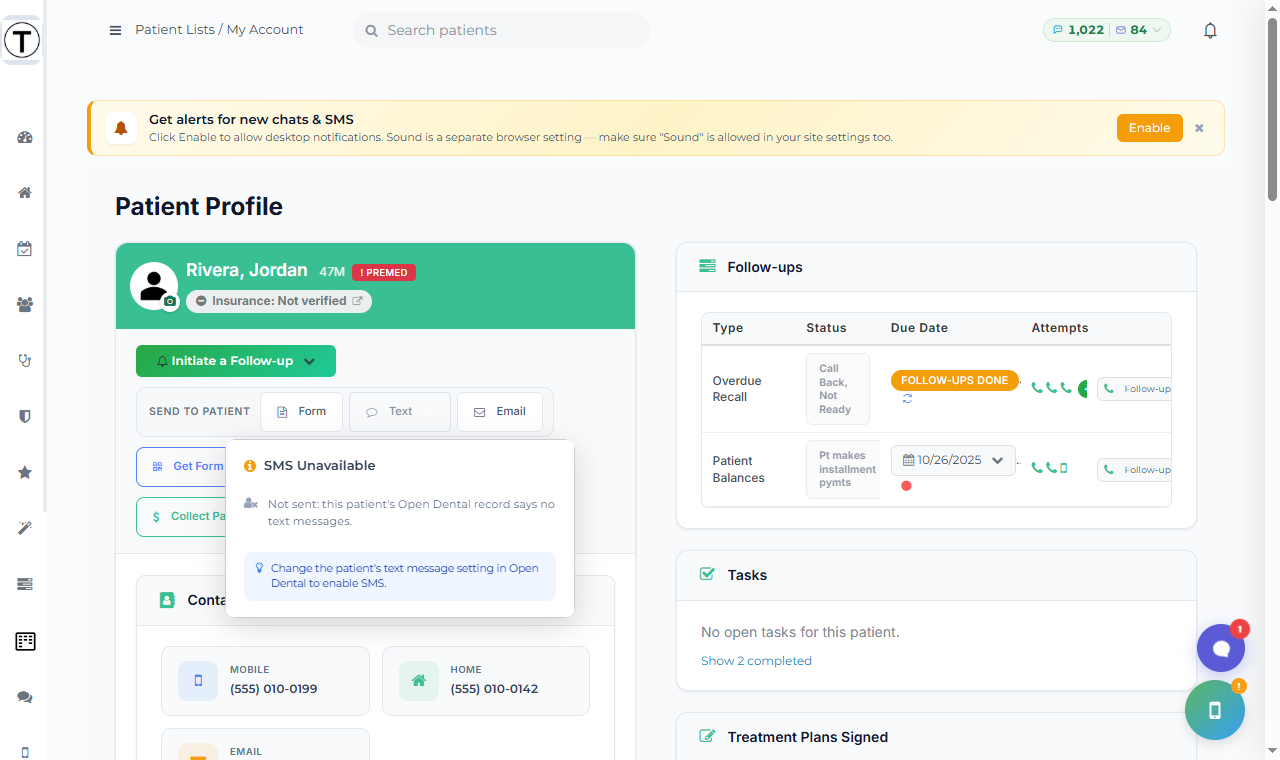
This kind of block is different from a texted STOP in two ways:
- It’s for that one patient only, not everyone who shares the phone number.
- Your team fixes it by changing the patient’s text setting in Open Dental. Once that change reaches Teamio, reload the patient’s profile.
If a patient both texted STOP and is marked no texts in Open Dental, they need to text START and have the Open Dental setting changed before texts can go out.