
Insurance Verification overview
What’s in this section
Section titled “What’s in this section”Insurance Verification checks a patient’s coverage electronically, with the carrier, and puts the answer where your team already works: a dashboard of upcoming appointments, a full benefit breakdown per patient, a printable handout you can hand the patient, and — if you want it — a date and a note written straight into Open Dental.
Instead of calling a payer or logging into a portal, you get the plan status, the annual maximum and what’s left of it, the deductible, coverage percentages by category and by procedure code, frequency limits, waiting periods, and the payer’s own record of recent services.
Where: Sidebar → the shield icon → Benefits & eligibility
What you get
Section titled “What you get”- A dashboard of every upcoming appointment with its coverage status, remaining benefits, and the issues worth acting on before the patient arrives. → The Benefits & eligibility dashboard
- A full benefit breakdown per patient — rings, tables, per-procedure coverage, and what the payer says was done elsewhere. → Reading a verification
- A patient handout you can print or save as a PDF, and optionally file into Open Dental imaging. → The patient benefits handout
- Automatic checks each morning before the appointment, so most patients are already verified when your day starts. → Automatic verification
What you configure
Section titled “What you configure”- Precheck settings — whether checks run automatically, how far ahead, how often a patient is due again, and which procedure codes every check asks about. → Precheck settings
- Carriers and payer mapping — which carriers can be checked electronically, and which should be left to a phone call. → Carriers and payer mapping
- What gets written into Open Dental — three independent switches. → Recording results in Open Dental
How it fits together
Section titled “How it fits together”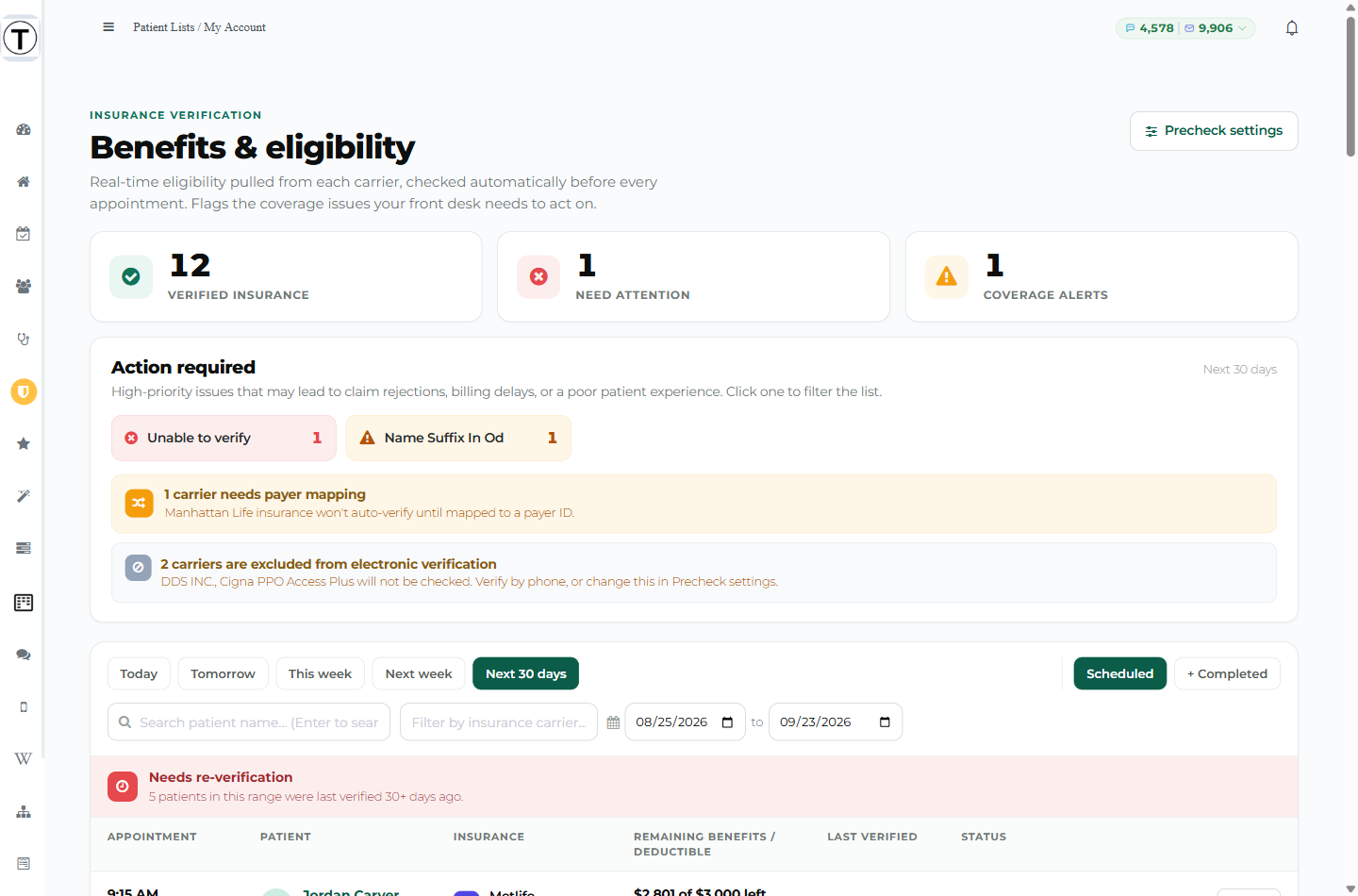
The dashboard is the daily view. Each row is an upcoming appointment; the columns tell you whether that patient’s plan is verified, what’s left of their benefits, and when it was last checked. Action required at the top pulls out the problems worth fixing before the patient sits down — a missing member ID, a carrier that isn’t mapped, a maximum that’s already used up.
Click any row to open the full benefit detail, and from there print the handout or run another check.
Results reach four places:
- The dashboard row — status, remaining benefits, last verified.
- The detail drawer — the full breakdown.
- Open Dental — an Eligibility Last Verified date and a Communication Log note, if you leave those switched on.
- The patient’s chart in Teamio — the same status chip appears on their Patient Profile.
What costs money and what doesn’t
Section titled “What costs money and what doesn’t”Every check that actually reaches the carrier is a billed transaction, whether the carrier says yes or no. That matters for how you use the feature, so Teamio is explicit about it everywhere a check can start.
These are billed:
- Any check you run by hand with Verify or Re-check.
- Any check the nightly automation sends.
- A check the carrier answers with “we can’t find this patient” — the carrier received it and replied, so it counts.
- A patient with two plans: one click checks both, and that’s two billed checks.
These cost nothing:
- A check Teamio refuses to send because the record is incomplete — missing or placeholder member ID, missing or invalid subscriber date of birth. You’ll see the words “No check was run (no charge)”.
- A carrier you’ve excluded from electronic verification.
- A payer that doesn’t support electronic eligibility at all.
- A check that gets skipped because the patient was verified recently — see Automatic verification.
- Anything a payer couldn’t answer because its system was temporarily down. Those retry on their own, free.
You can see the running count any time: Precheck settings → Automation, top of the tab, or My Account → Credits → Usage report.
In this section
Section titled “In this section”- The Benefits & eligibility dashboard — the daily view, its filters, statuses, and the Action required panel
- Verifying a patient — running a check by hand, and what the confirmation tells you
- Reading a verification — every section of the benefit detail, explained
- The patient benefits handout — printing or saving the PDF for the patient
- Automatic verification — nightly checks, verify-on-booking, and when a check is skipped
- Precheck settings — every setting, what it does, and what it costs
- Carriers and payer mapping — unmapped carriers, payer IDs, and excluding a carrier
- Recording results in Open Dental — the three write-back switches
- What each status and message means — every status, whether it cost anything, and what to do next