
Automatic verification
Automatic verification is the point of the feature. Once it’s on, Teamio walks the next few days of your schedule at a set time each day and verifies the patients who need it — so the front desk starts the morning with a dashboard that’s already answered.
Where: Precheck settings → Automation tab.
The two automatic modes
Section titled “The two automatic modes”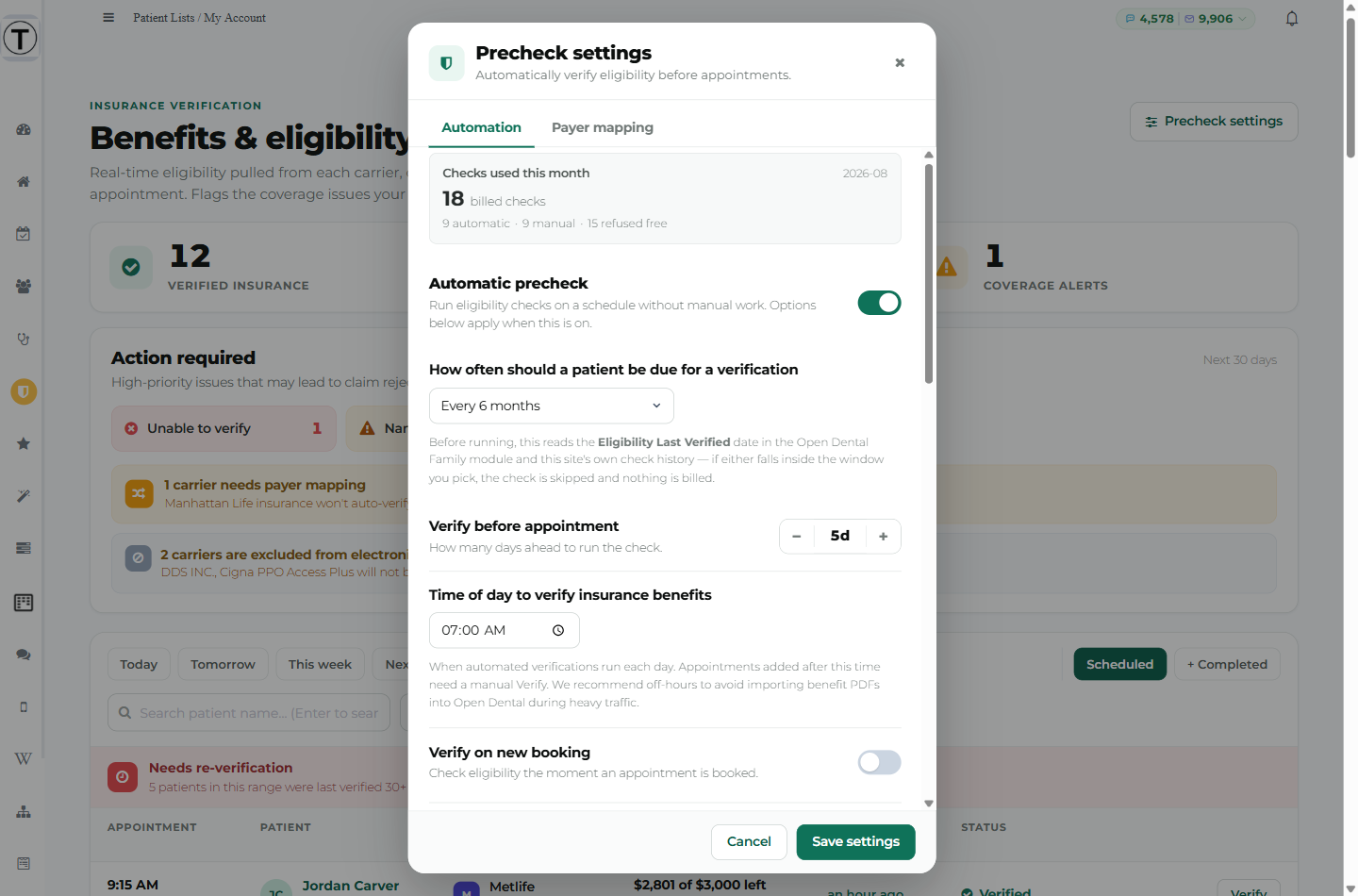
Automatic precheck
Section titled “Automatic precheck”Run eligibility checks on a schedule without manual work. Options below apply when this is on.
Once a day, at the time you choose, Teamio looks at every appointment from now through the end of your lookahead window and verifies the insured patients who are due. Uninsured patients are never checked.
Verify on new booking
Section titled “Verify on new booking”Check eligibility the moment an appointment is booked.
This catches the gap the daily run leaves. A patient who books at 2 pm for tomorrow morning missed this morning’s run; with this on, their check happens shortly after booking instead of waiting a day.
The three settings that shape it
Section titled “The three settings that shape it”| Setting | Default | What it does |
|---|---|---|
| Verify before appointment | 3 days | How far ahead the run looks. Range 0–14. |
| Time of day to verify insurance benefits | — | When the daily run starts, in your practice’s own time zone. |
| How often should a patient be due for a verification | Every 6 months | How recent a result has to be for Teamio to reuse it instead of paying for a new one. |
Choosing a run time
Section titled “Choosing a run time”The in-app help says it plainly:
When automated verifications run each day. Appointments added after this time need a manual Verify. We recommend off-hours to avoid importing benefit PDFs into Open Dental during heavy traffic.
Off-hours is right, but very early is not automatically better. Some carriers take their real-time systems down overnight and simply don’t answer — the check comes back “unable to respond at this time” and the patient stays unverified even though nothing is wrong with their record.
Choosing a lookahead
Section titled “Choosing a lookahead”A longer window is usually cheap, because patients who are already verified get skipped. The in-app warning explains where the cost actually shows up:
A longer window is usually inexpensive — already-verified patients are skipped. The cost shows up on patients whose check fails: those get retried on each remaining day in the window. Fix flagged records in Open Dental before widening this.
So: clear the amber Action required chips first, then widen.
When a check is skipped — and nothing is billed
Section titled “When a check is skipped — and nothing is billed”This is the setting that controls your spend. Before sending anything, Teamio checks four things, and any one of them means no check and no charge:
- Open Dental’s own date. If the Eligibility Last Verified date in the Family module falls inside your re-verification window, the check is skipped — so work your team did manually in Open Dental is honoured, not repeated.
- Teamio’s own history. If this practice already has a Verified result for that plan inside the window, it’s reused.
- A recent inactive result. If the last answer was inactive and it’s less than two weeks old, it isn’t re-asked. Coverage does get reinstated, so this window is deliberately short — days, not months.
- Same day. A patient is only ever checked once per day, no matter what else is true.
The in-app help under the window setting says the same thing:
Before running, this reads the Eligibility Last Verified date in the Open Dental Family module and this site’s own check history — if either falls inside the window you pick, the check is skipped and nothing is billed.
”Before every appointment” doesn’t mean “every night”
Section titled “”Before every appointment” doesn’t mean “every night””Choosing Before every appointment anchors the check to the visit, not to the calendar:
Every appointment gets its own check. A patient is still only checked once per appointment, not once per night.
Without that rule, a patient sitting in a 5-day lookahead would be re-checked five times for one visit.
The cost warning on short windows
Section titled “The cost warning on short windows”Anything shorter than six months shows:
Re-checking this often means many more billed checks — a patient seen regularly can be re-verified several times a year instead of twice. Every 6 months is the recommended setting.
When a carrier can’t be reached
Section titled “When a carrier can’t be reached”Carrier systems go down. When one does, Teamio treats it as temporary:
- The check is retried automatically, at no charge.
- The dashboard row says so — “Couldn’t reach {Carrier} — will retry automatically tonight” (or “closer to the appointment” if the visit is beyond your lookahead window).
- If a carrier keeps failing for the same patient, retries pause for a couple of days rather than looping. A carrier outage isn’t the patient’s fault, so the pause is short.
Separately, if a check reaches a carrier and gets rejected twice in a row for the same patient and plan — a member ID the carrier doesn’t recognise, for instance — automatic retries stop for two weeks. Those rejections are billed, and repeating them nightly just spends money on a record that needs a human. Correcting the member ID in Open Dental releases the pause immediately, and clicking Verify yourself is never blocked.
Turning it on for the first time
Section titled “Turning it on for the first time”- Set the Billing provider. Nothing runs without it.
- Clear the amber chips in Action required — those are free to see and cheap to fix, and they’re the main source of wasted checks.
- Map or exclude any carriers flagged on the dashboard. See Carriers and payer mapping.
- Verify a handful of patients by hand and confirm the results look right.
- Only then turn on Automatic precheck — and decide separately about Verify on new booking.
- Watch the meter at the top of the Automation tab for the first week.
Troubleshooting
Section titled “Troubleshooting”Automation is on but nothing was checked overnight
Section titled “Automation is on but nothing was checked overnight”Most often everyone in the window was already verified inside your re-verification period — which is the system working. Check the Last verified column: if it’s populated, they were skipped, not missed.
Otherwise confirm the Billing provider is set, and that the patients in question actually have insurance on file in Open Dental.
One carrier’s patients never verify overnight
Section titled “One carrier’s patients never verify overnight”See Choosing a run time above — try moving the run later before assuming a data problem.
A patient booked this afternoon wasn’t verified
Section titled “A patient booked this afternoon wasn’t verified”The daily run happens once, at your chosen time. Appointments added after it need either Verify on new booking switched on, or a manual Verify.