
Carriers and payer mapping
Before Teamio can ask a carrier about a patient, it has to know which payer that carrier is on the electronic network. Most of the time it works this out on its own. The Payer mapping tab is where you fix the ones it can’t — and where you tell it to stop trying on carriers that will never answer usefully.
Where: Benefits & eligibility → Precheck settings → Payer mapping.
How a carrier gets resolved
Section titled “How a carrier gets resolved”Carriers resolve to a Stedi payer automatically when Open Dental has an Electronic ID or a global default exists. Anything left Unmapped can’t be verified until you add a payer ID below.
In order:
- The carrier’s Electronic ID in Open Dental. This handles the overwhelming majority of a well-maintained book — often well over 90% of patients, with no mapping work at all.
- A mapping you’ve saved here, which overrides everything for that carrier.
- A small global default list Teamio maintains for a handful of large national carriers matched by exact name.
If none of those produce an answer, the carrier is Unmapped.
The list
Section titled “The list”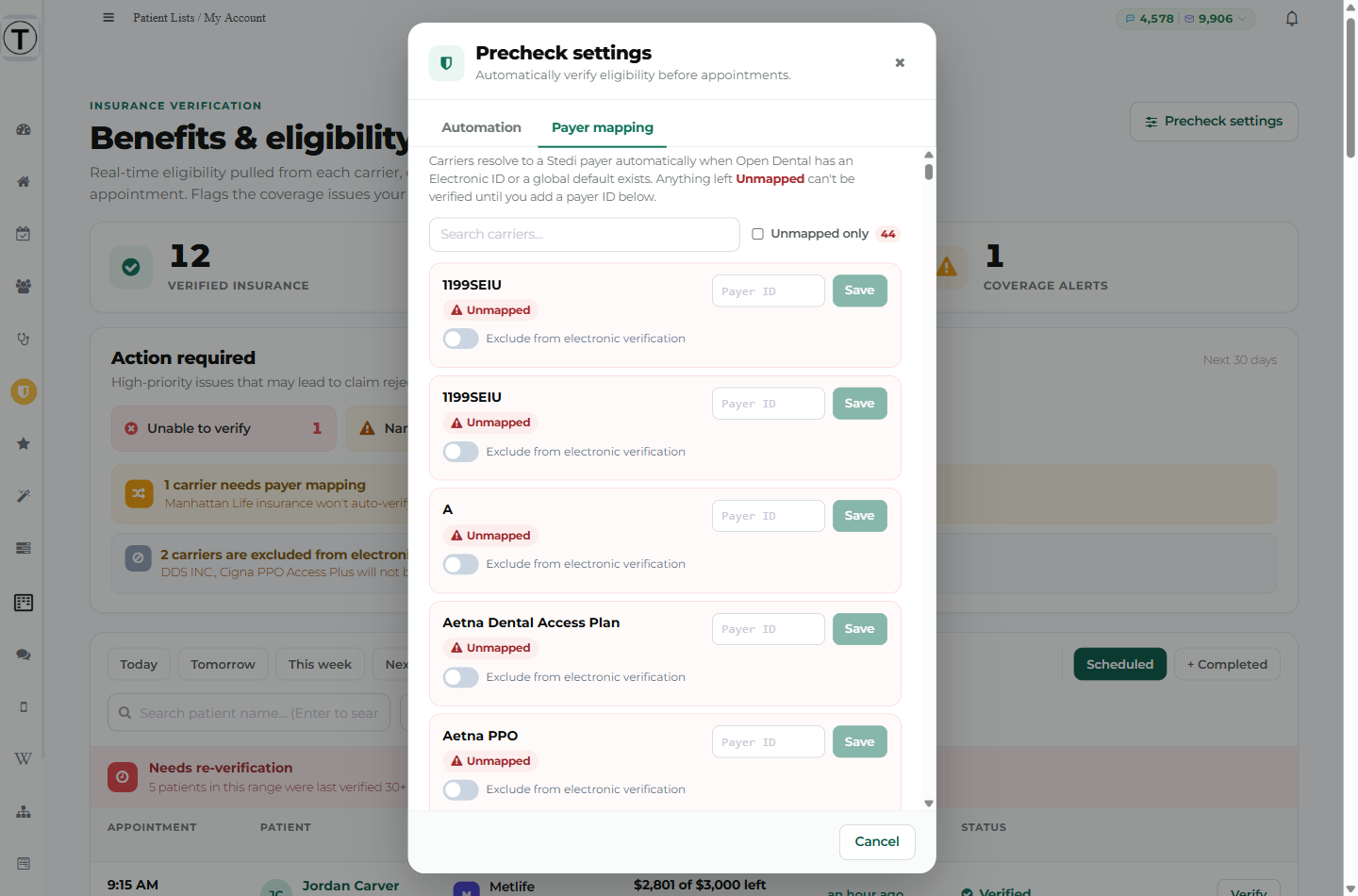
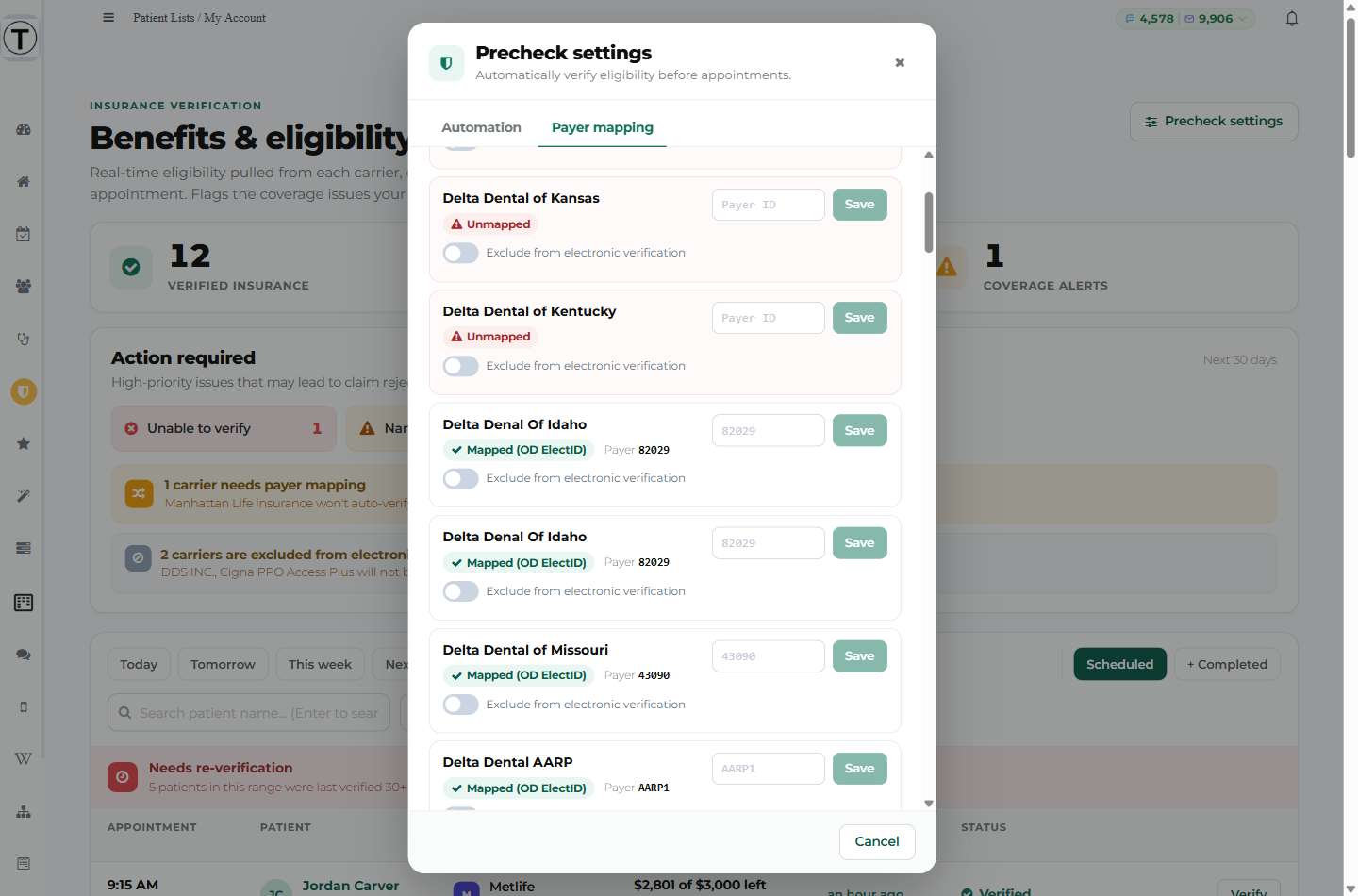
Each row is one carrier from your Open Dental, with:
- A status chip — Unmapped (red) or a green Mapped (…) telling you how it resolved:
- Mapped (OD ElectID) — from the Electronic ID in Open Dental
- Mapped (manual) — from a payer ID you saved here
- Mapped (default) — from Teamio’s global list
- The resolved Payer {id}, once mapped
- A Payer ID box and Save button
- An Exclude from electronic verification toggle
Use Search carriers… to find one, or tick Unmapped only to work through the backlog. The count beside it is how many are unmapped.
Mapping a carrier
Section titled “Mapping a carrier”- Find the carrier — Unmapped only is the fastest route.
- Type the payer ID into the Payer ID box.
- Select Save. The chip flips to Mapped (manual).
Payer IDs are text, not numbers — keep any leading zeros exactly as given.
The better long-term fix for most carriers is to put the correct Electronic ID on the carrier record in Open Dental. That resolves it here automatically and fixes it everywhere else in your practice too.
Excluding a carrier
Section titled “Excluding a carrier”Some carriers technically answer an eligibility request but tell you nothing — no annual maximum, no deductible, no ortho allowance. The check succeeds, bills, and leaves you no better off. Capitation and network-access products are the usual culprits.
Turn on Exclude from electronic verification for those. From then on:
- They’re never checked automatically.
- The dashboard shows an Excluded tag instead of a Verify button.
- Trying to verify one anyway returns “No check was run (no charge)”, naming the carrier and pointing you back here.
- The dashboard shows a grey banner listing them: “{names} will not be checked. Verify by phone, or change this in Precheck settings.”
This saves as soon as you toggle it — you don’t need to save the Automation tab as well.
”Unrecognized carrier ID” on the dashboard
Section titled “”Unrecognized carrier ID” on the dashboard”This amber chip means a carrier’s Electronic ID in Open Dental isn’t one any payer on the network answers to — often a placeholder or catch-all ID that was never a real payer ID.
- These checks are free. They can’t be routed, so they never reach a payer and are never billed.
- But those patients can’t be verified at all until the ID is corrected.
Fix it on the carrier record in Open Dental. One correction usually clears a large batch of patients at once, since a catch-all ID is typically shared across hundreds of them.
Carriers that don’t support electronic eligibility
Section titled “Carriers that don’t support electronic eligibility”A few payers simply don’t offer electronic eligibility. For those, the drawer shows Can’t be verified electronically:
This plan has to be verified by phone. Checking again won’t help — the payer doesn’t offer electronic eligibility at all.
There’s deliberately no Verify button on that state, and nothing is billed. Phone those in.
Troubleshooting
Section titled “Troubleshooting”A carrier appears twice
Section titled “A carrier appears twice”Open Dental can hold more than one carrier record with the same name — different plans, different addresses. Map each one, or fix the duplicates in Open Dental.
I mapped a carrier but patients still won’t verify
Section titled “I mapped a carrier but patients still won’t verify”Check the dashboard’s Action required chips for that patient. A correct payer mapping doesn’t help if the member ID is missing or a placeholder.
The list is empty
Section titled “The list is empty”Teamio reads carriers from your Open Dental. “No carriers found for this practice” means the connection isn’t returning them — contact Teamio.