
Verifying a patient
Most patients get verified automatically. When you need one now — a new patient, a plan that just changed, a walk-in — you can run a check by hand from three places. All three end at the same confirmation panel, because every one of them spends money.
Where the buttons are
Section titled “Where the buttons are”| Where | Button |
|---|---|
| Dashboard table, on any row | Verify |
| The benefit drawer, top right | Re-check |
| The drawer’s plan tabs (two-plan patients) | Re-check this plan only |
| Patient Profile → Insurance card | Verify insurance or Re-check insurance |
- Find the patient — on the dashboard, or open their Patient Profile.
- Select Verify (or Re-check).
- Read the confirmation panel. It shows exactly what will be sent and what it will cost.
- Select Run check.
The check takes roughly 20–30 seconds. The row and the drawer update themselves when it lands.
The confirmation panel
Section titled “The confirmation panel”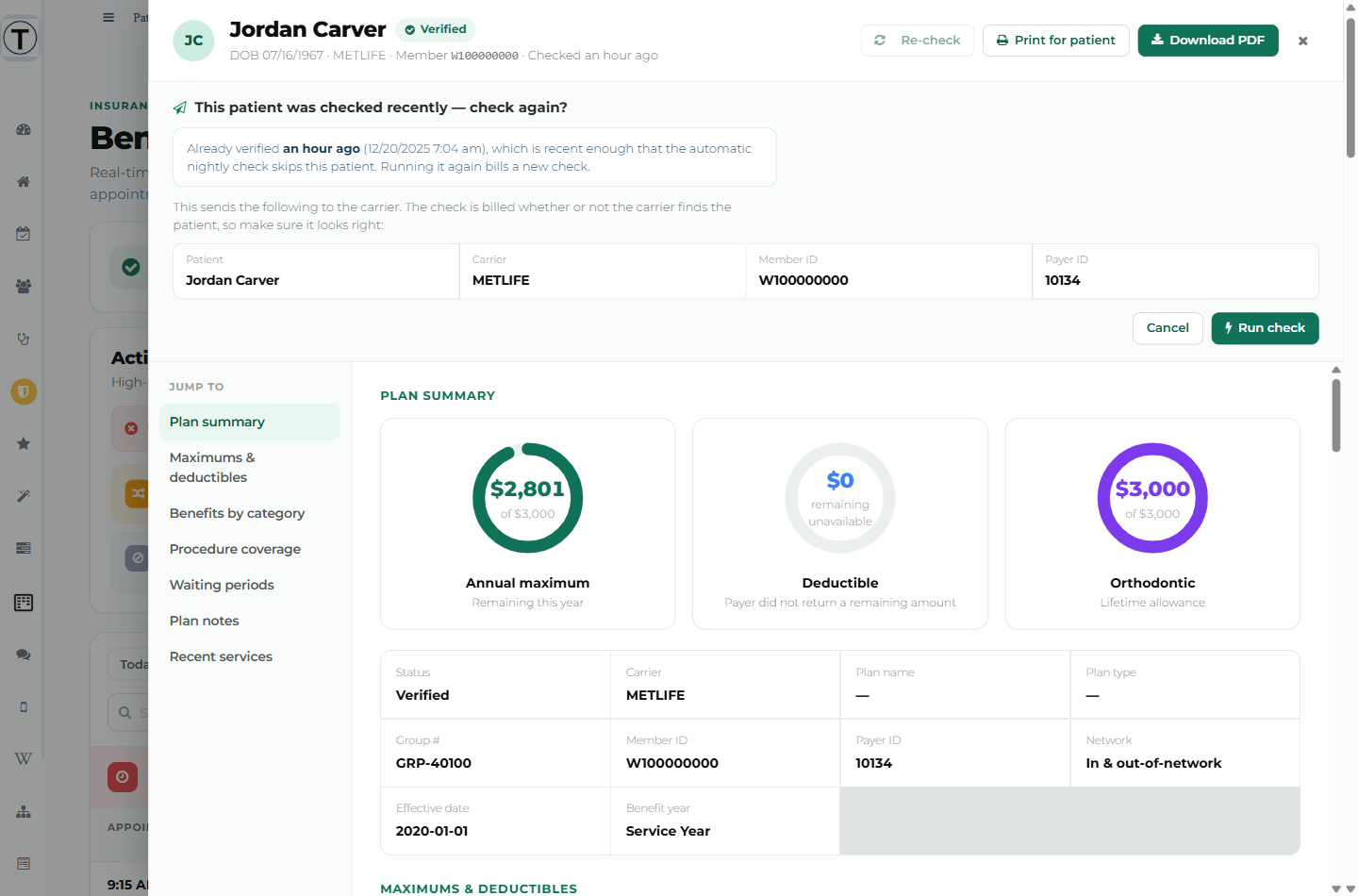
This is the one place in Teamio that authorises a billed check, so it’s worth reading rather than clicking through.
The line above the grid is blunt on purpose:
This sends the following to the carrier. The check is billed whether or not the carrier finds the patient, so make sure it looks right:
The grid shows Patient, Carrier, Member ID, and — where known — Payer ID and Subscriber DOB. If something there is wrong, the carrier will reject the check and you’ll still be billed for it. Fix it in Open Dental first.
”This patient was checked recently”
Section titled “”This patient was checked recently””If the patient is still inside your re-verification window, the panel says so:
Already verified an hour ago, which is recent enough that the automatic nightly check skips this patient. Running it again bills a new check.
That’s not a block — sometimes a plan really has changed. It’s there so you’re not paying for a check you already have.
Two plans means two checks
Section titled “Two plans means two checks”For a patient with a secondary plan, the panel warns:
This patient has a secondary plan. Both plans are checked, so this runs 2 separate checks and is billed twice.
If you only need one of them, open the drawer, choose the Primary or Secondary tab, and use Re-check this plan only. That runs a single check and leaves the other plan’s result alone.
When the record is incomplete
Section titled “When the record is incomplete”If Open Dental is missing something the carrier requires, the panel changes: the title flags the problem, the grid becomes “Here’s what Open Dental has on file for this patient today”, and you get:
Fix this on the patient’s insurance plan in Open Dental, then run the check again. Nothing is sent to the carrier and nothing is billed until the record is corrected.
The buttons change too — Close & fix in Open Dental, and Run check anyway if you’re certain the record is fine.
From the Patient Profile
Section titled “From the Patient Profile”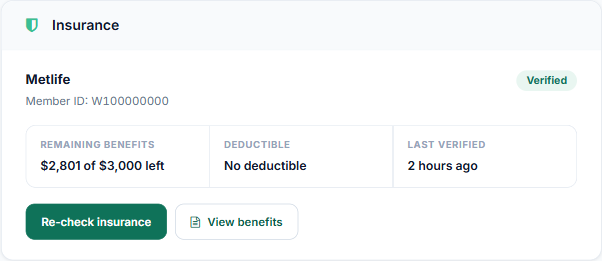
The Insurance card gives you the short version — carrier, member ID, status, remaining benefits, deductible, and when it was last checked. Patients with two plans get Primary and Secondary tabs.
- Verify insurance / Re-check insurance runs a check. Every click here confirms first, even for a patient who’s never been checked.
- View benefits opens the same full drawer you get from the dashboard.
There’s also a status chip under the patient’s name at the top of the profile — Insurance: Verified · 2 hours ago — which links straight to the dashboard.
Troubleshooting
Section titled “Troubleshooting”The Verify button isn’t there
Section titled “The Verify button isn’t there”Either the carrier is excluded (you’ll see an Excluded tag instead), the plan can’t be verified electronically at all, or an admin has turned off Insurance verification on-demand.
”This check is still running — refresh in a moment”
Section titled “”This check is still running — refresh in a moment””Not an error. The check outlived the page’s waiting time and is finishing in the background. Give it a moment and refresh — the result will be there, and it isn’t billed twice.
It says “No check was run (no charge)”
Section titled “It says “No check was run (no charge)””Teamio refused to send it. The message names the reason — a missing member ID, an unmapped carrier, an excluded carrier, or a payer with no electronic eligibility. See What each status and message means.
Nothing happened when I clicked Verify on the dashboard
Section titled “Nothing happened when I clicked Verify on the dashboard”If the patient was verified recently, the row’s Verify button opens the drawer with the confirmation panel rather than firing straight away. Scroll up in the drawer — the panel is at the top.