
Patient outreach overview
Patient Outreach turns your Open Dental data into prioritized call and text lists, so the production and care that would otherwise slip through the cracks become a worklist someone can actually clear. Instead of digging through reports, you open a list, see exactly who needs a contact attempt today, and log what happened — and the next person picks up right where you left off.
There are four lists, each a button in the top navigation bar — every one is money or care waiting for a phone call or text:
- Overdue Recall — hygiene patients due back who haven’t booked
- Unscheduled Tx — diagnosed treatment never scheduled
- Aging — outstanding claims, pre-authorizations, and patient balances
- Broken Appointments — appointments that fell off the schedule
What you can do
Section titled “What you can do”- Work a list — filter to the patients worth calling today, then open each one to make and record a contact attempt.
- Log follow-ups — capture the call/text/email outcome and a one-line note in the follow-up panel; the next attempt date sets itself so nobody starts from zero.
- Save lists — on Overdue Recall and Unscheduled Tx, turn checked patients into a named, reusable saved list the team chips away at over days.
- Text patients — text one patient from their follow-up panel, or save several as a list and send to it as a campaign with delivery reporting and click tracking (see texting from a list).
- Set accountability and goals — assign who owns each list and the daily/weekly/monthly call goals in follow-up settings; progress shows on every list and on Today’s Dashboard.
- Check what got sent — the Recall Reminder Text Report shows every automated recall reminder your practice has sent, for any date range.
When to use which list
Section titled “When to use which list”- Schedule looking light? Start with Overdue Recall (hygiene patients due back) and Unscheduled Tx (diagnosed work never booked) — that’s where new appointments come from.
- Collections behind? Work Aging — outstanding insurance claims, stalled pre-authorizations, and patient balances, each on its own tab.
- A cancellation or no-show just happened? Broken Appointments surfaces the breaks worth chasing while they’re still fresh and easy to rebook.
How the lists work
Section titled “How the lists work”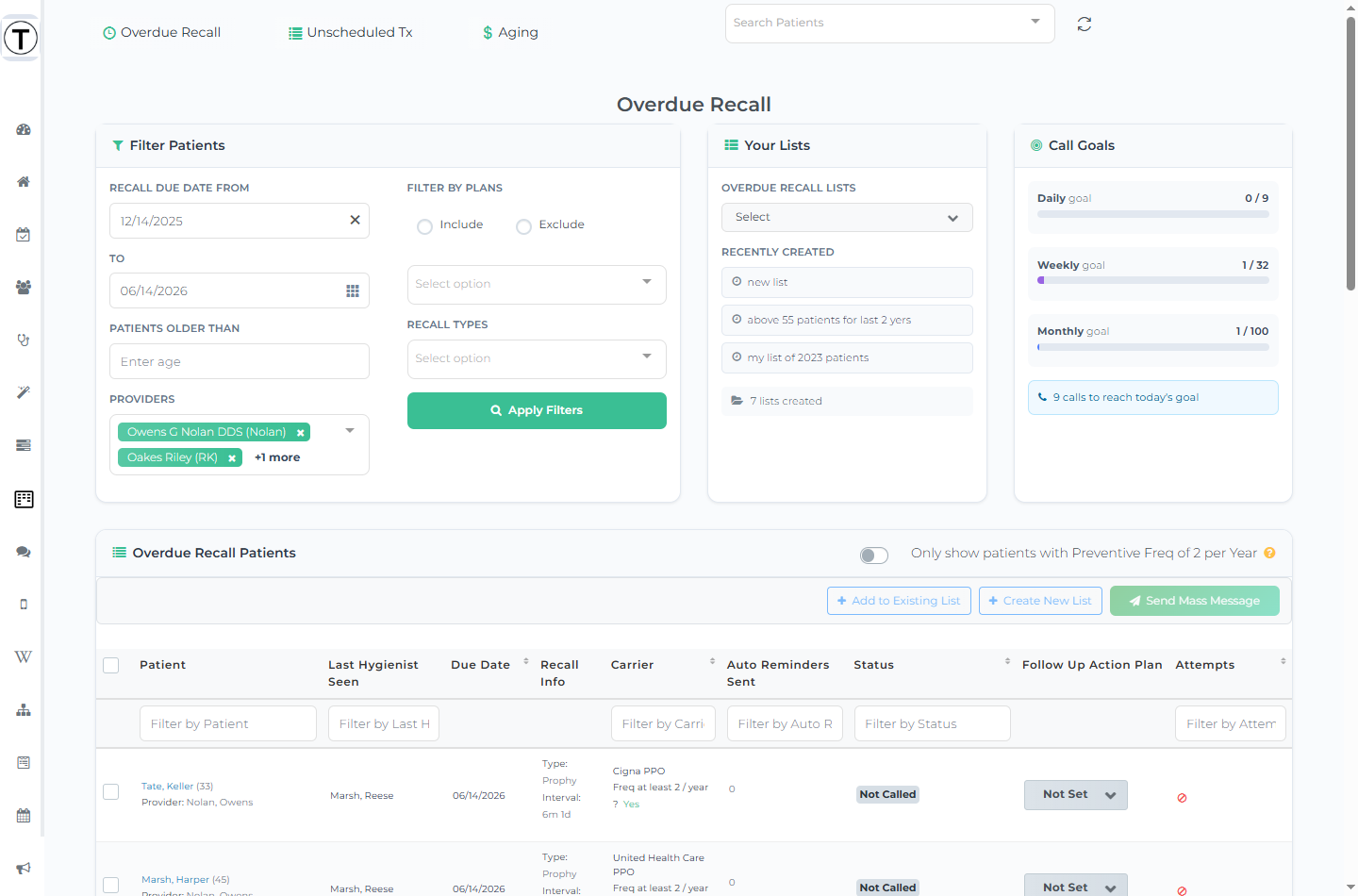
Every list follows the same pattern: filter to the patients worth working today, open each patient to log a call, text, or note, and record where things stand in the follow-up panel so the next person doesn’t start from zero. To text a patient you open their follow-up panel (SMS Followup) — there is no “Text” button on a list row. To reach several patients at once, check them, save them as a list, and send to that list as a campaign — see texting from a list.
Each list page also shows a Call Goals panel — daily, weekly, and monthly progress bars with a motivational badge — fed by the goals your office sets in follow-up settings. It’s the visible payoff that turns outreach from “when I have time” into a daily habit, and the same goals appear on Today’s Dashboard.
Saving and reusing lists
Section titled “Saving and reusing lists”On Overdue Recall and Unscheduled Tx you can turn the patients you’ve checked into a named, reusable saved list so the team can chip away at the same group over days. (Aging and Broken Appointments don’t have checkboxes or saved lists.) Accountability, call goals, and follow-up cadence aren’t set per list — they’re configured office-wide per list type in follow-up settings.
Start here
Section titled “Start here”- Work a list with follow-ups — the rhythm that makes outreach stick
- Save and reuse focused lists
- Text patients from a list
- The patient profile — everything about one patient in one place