
Viewing submissions
Where: Sidebar > Forms > Your Form Submissions panel
Find a submission
Section titled “Find a submission”Completed forms appear in the Your Form Submissions panel. Columns:
| Column | What it shows |
|---|---|
| Form Name | The form the patient completed (plus a language badge like ES if it wasn’t English) |
| Type | NP_FORM, MED_HX_UPDATE, or OTHER |
| Patient | The linked patient (a link to their profile), or a Not linked — Link patient pill |
| Submitted | When the patient submitted |
| Updated | Last update time |
| Actions | Pin/Unpin, and link-to-patient for unlinked rows |
Filter and sort to narrow the list:
- Filter by submission name…, Filter by form type, Filter by patient (with avatars), Filter by date submitted, Filter by date updated, and Clear Filters.
- The Form Name, Submitted, and Updated columns are sortable.
- The list paginates 10 per page. With filters applied and no matches, you’ll see No form submissions match your filters.
Pin the submissions you’re working through (Pin/Unpin Submission) — pinned ones float to a Pinned section at the top.
Link an unlinked submission
Section titled “Link an unlinked submission”A submission made from a link with no patient (a new-patient link) arrives unlinked, showing the Not linked — Link patient pill. Select it to open the Link Submission to a Patient modal, choose the patient, and select Link Patient. Until you do, the submission can’t write to any chart.
Read a submission
Section titled “Read a submission”Select a submission’s name. It opens read-only with the form name as the header and the subtitle Form Submission Details, rendered exactly as the patient completed it — including any signature. A submission completed in another language renders in that language. There is no Print PDF button: the PDF files into Open Dental imaging automatically.
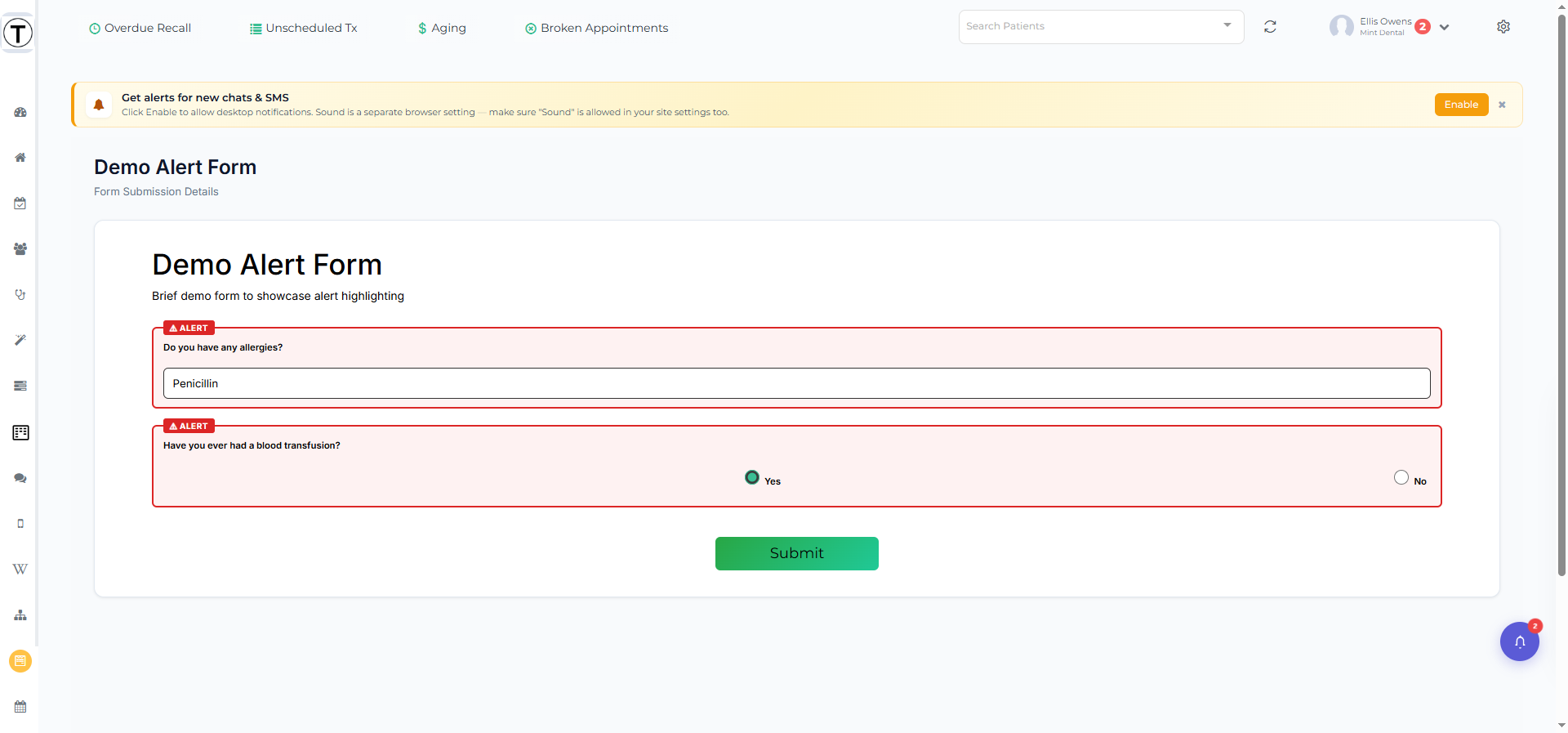
Alert highlighting: any control flagged Highlight for Alert (or any flagged option) shows highlighted in red here and in the PDF, so safety-critical answers (allergies, blood thinners) catch the reviewer’s eye. On an Open Dental Data Field set to Diseases, Allergies, or Medications, a patient who selects only None is never highlighted, even with Highlight for Alert on; Referrals has no None option, so any pick highlights.
A linked patient name is a link that opens the Patient Profile in a new tab.
You can also get alerted the moment a form arrives: the Action Center shows a Form submitted card with a View form button, and a packet gets one card that fills in as the patient goes. See Form alerts and Packet alerts.
Where the data goes
Section titled “Where the data goes”Per-control mappings can update the patient’s chart, and the form’s PDF files into Open Dental imaging automatically — see Forms and Open Dental.