
Booking links and source tracking
A booking link is a short URL that opens your public booking page. Add UTM tags and the dashboard tells you exactly which placement — your website, Google, a campaign, a recall text — produced each booking.
Where to grab a link
Section titled “Where to grab a link”There’s no “Grab a Link” on the sidebar or the dashboard. Links come from three places:
- Your main booking link — Settings > General > Online Scheduling URL section. Wait for the short link to finish generating, then select Grab a Link next to Your Booking Link.
- Per-appointment-type links — Settings > Appointment Types > Grab a Link on any type card. This makes a link that drops the patient straight onto that one type (for example a link that opens directly on New Patient Exam).
- Per-location links — multi-location practices in Separate Links mode get a Grab a Link for each location, each with its own branding. See Online booking for multi-location practices.
Tagging a link with UTM tracking
Section titled “Tagging a link with UTM tracking”Selecting Grab a Link opens the UTM Link Builder.
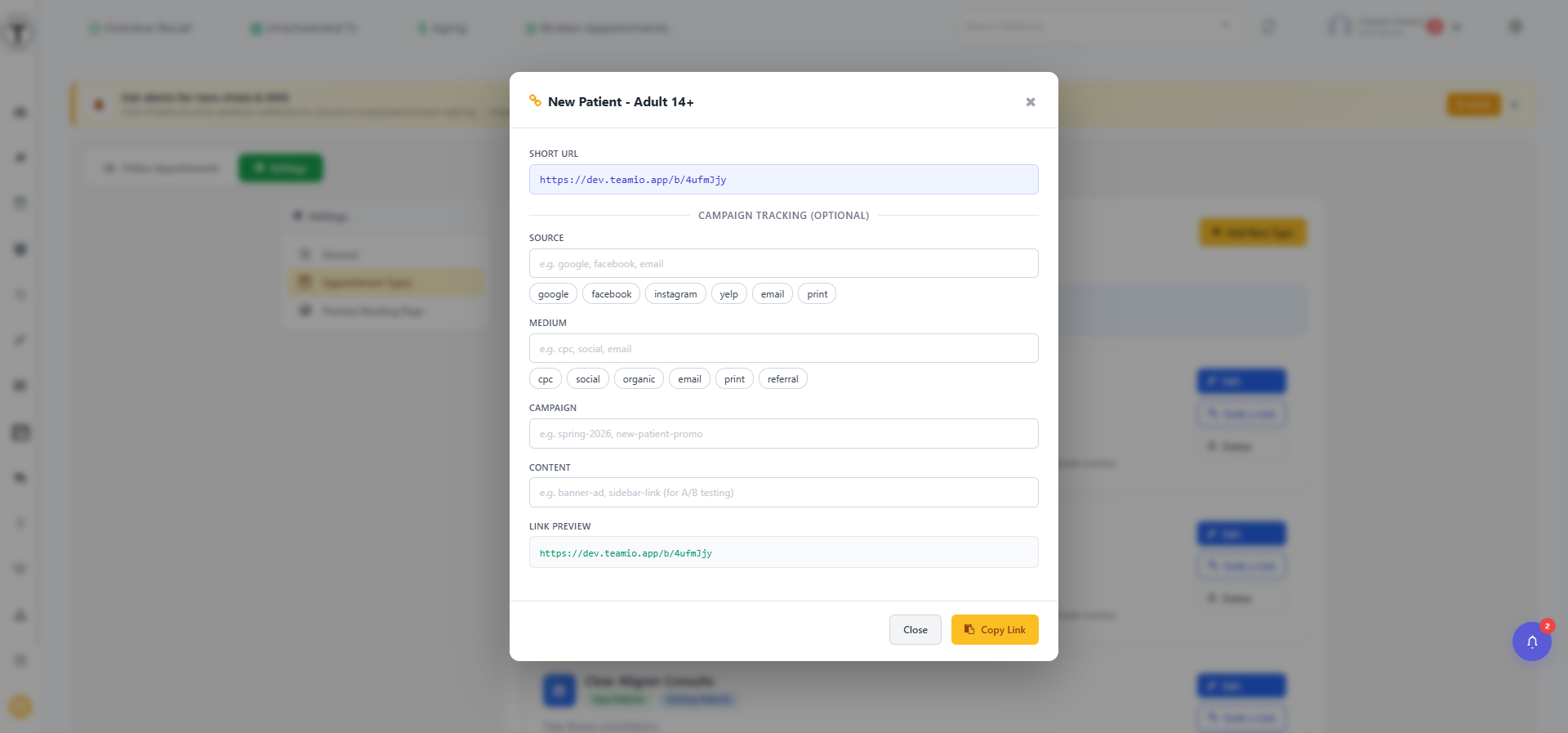
At the top is the read-only Short URL — your base link, of the form <app domain>/b/<id>. Under Campaign Tracking (optional) are four fields; whatever you set is appended to the link as ?utm_source=...&utm_medium=...:
| Field | What it’s for | Quick-pick chips |
|---|---|---|
| Source | Where the link lives | google, facebook, instagram, yelp, email, print |
| Medium | The kind of channel | cpc, social, organic, email, print, referral |
| Campaign | A named push, e.g. spring-special | — (free text) |
| Content | A/B test which placement won, e.g. header-button vs footer-link | — (free text) |
A live Link Preview shows the fully tagged URL as you type. Select Copy Link to copy it, or Close to back out. A link with no UTM tags still works — those bookings just show as Direct in the dashboard.
Where to put them
Section titled “Where to put them”Make a separate tagged link for each placement, so the dashboard tells you what’s actually producing bookings:
- Your website’s “Book Now” button
- Your Google Business Profile
- Campaign emails and texts
- Individual texts from outreach lists — a recall text with a booking link converts without a phone call
- Social posts (use Content to compare two posts of the same campaign)
Reading the results
Section titled “Reading the results”In the dashboard, filter by Source and hover any booking’s source badge for its full Source / Medium / Campaign / Content detail. After a month you’ll know whether Google, the website, or campaigns drive your online bookings — and where another link would pay off.