
Running your morning huddle
Today’s Huddle puts the numbers a morning meeting needs on one page — no report-pulling, no spreadsheet.
Where: Sidebar > Today’s Huddle (/app/huddle)
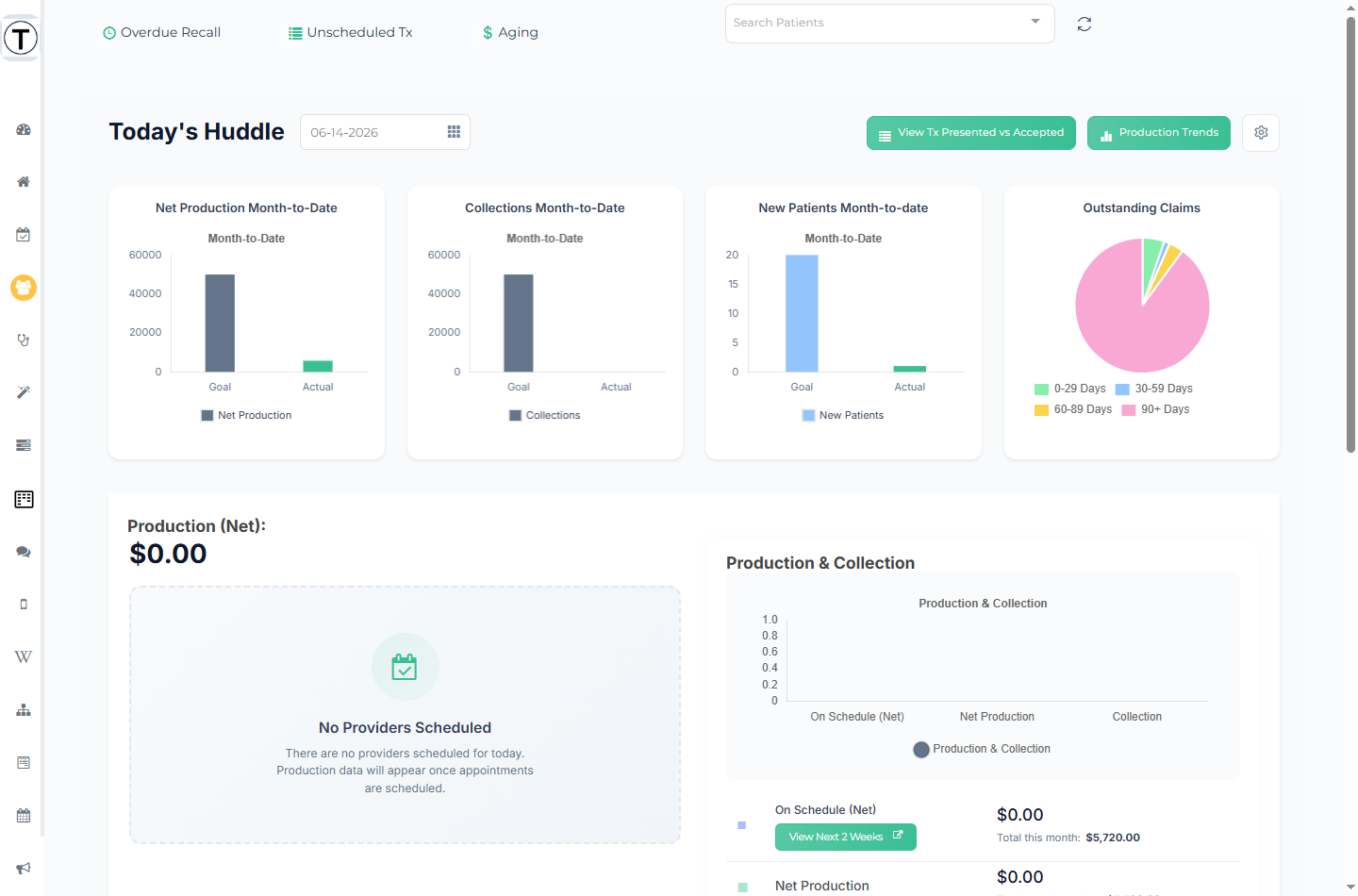
A date picker (format MM-DD-YYYY) sits next to the Today’s Huddle title — use it to review any prior day.
What’s on the page
Section titled “What’s on the page”Month-to-date cards across the top:
- Net Production Month-to-Date
- Collections Month-to-Date
- New Patients Month-to-date
- Outstanding Claims (a pie chart)
Production (Net) — a per-provider table with Production (Net), $/HR, On Schedule (Net), and Sched $/HR, with month-to-date detail links — alongside a Production & Collection bar chart for the month.
Day widgets:
- Net $ Tx Planned — treatment planned per provider, for Today and Month-to-date.
- Hygiene Re-Appointment — Seen and Re-appt counts and the percentage.
- Patient on Schedule Balances — today’s scheduled patients who carry a balance, grouped by operatory.
Hygiene Opportunities — cards for Unscheduled Family Recalls, X-rays, Unscheduled Tx, and Ortho Benefits.
Also on the page: an Internal Referrals & Production table (today’s patients who referred others, with their completed production), and Today’s Birthdays on Schedule.
Most counts and dollar values are drill-down links — selecting one opens a detail modal (for example New Patients Today, the hygiene Seen/Re-appt lists, or a provider’s production detail).
Header actions
Section titled “Header actions”Three buttons at the right of the header each open a full-width slide-out report:
- View Tx Presented vs Accepted — how much of your diagnosed treatment is actually getting scheduled or completed, with a month-by-month acceptance percentage.
- Production Trends — production per clinical hour, provider rankings, and period-over-period comparison.
- The Set Goals gear opens Set Provider Goals — office goals, per-provider production goals, lunch durations, and procedure tracking. These are what every goal bar on the huddle measures against.
A 10-minute huddle that works
Section titled “A 10-minute huddle that works”- Put the huddle page on a screen everyone can see.
- Yesterday — production vs goal, and anything that broke.
- Today — the schedule’s shape: new patients, hygiene re-appointments, and openings worth filling from the Overdue Recall and ASAP lists.
- Money — outstanding claims and patient balances that need a push.
- Assign the follow-ups as tasks before the meeting ends — a huddle that creates tasks is a huddle that changed the day.
- Use the date picker on Mondays to review Friday.
- Set your Office Goals and per-provider goals once (Set Goals gear) so the goal bars are meaningful all month.
- Pair the huddle with Today’s Dashboard — huddle for the numbers, dashboard for the work lists.